You already have one sample application which you can launch from your desktop launcher, the To-do List. The other will be an example provided with VA Smalltalk, EwxDrawnListExample in EwExamples.
First, you need ICs for the two applications your desktop launcher will be launching. The first you already have, the To-do List, in ictest.ic. In this example, we're not going to go over again the packaging of the To-do List. If you don't have ictest.ic, perform the steps listed in Creating a reusable and a leaf IC. Note that ictest.ic is actually a leaf IC which you're not really going to use as a leaf IC in this example.
You can verify that the To-do List as packaged in ictest.ic will behave correctly when launched by the desktop launcher by executing code to simulate what the desktop launcher does. Try the following (be sure that you do not have IcTestView or IcTestModel already loaded in your image).
Next, you're going to package EwxDrawnListExample in EwExamples. Since you will be managing the loading and unloading of the To-Do List and EwxDrawnListExample ICs from your desktop launcher application, you can package these ICs as either reusable or leaf ICs. As usual, there are trade-offs between the two approaches. First, as leaf ICs and unlike reusable ICs, the packager will eliminate unneeded code during the reduction step resulting in a smaller IC in most cases. This is a factor in packaging EwExamples since you're using only one of the examples provided in the application. Second, should you ever want to run one of these applications without the desktop launcher, you can do so if you package it as a leaf IC. However, if you package, for example, EwExamples as a leaf IC and perform reduction, the resulting IC is less reusable since the only code it contained is code in support of EwxDrawnListExample.
Therefore, in the interests of reusability and to show that you can load and use both leaf and reusable ICs from your desktop launcher, you're going to package EwExamples as a reusable IC.
|
1.
|
|
2.
|
Open the Packager and on the Create New Instructions page, select Reusable Image Component. Enter IcTestDrawnListIcPackagingInstructions as the packaging instructions.
|
|
3.
|
Proceed with the packaging as in the first part of this example. The applications you are packaging are EwExamples and EwExamplesFramework, so you will select these from the ICs and Applications page of the Modify Instructions step and click on >> to include them.
|
|
4.
|
|
6.
|
Now we're ready to verify list.ic works correctly. You're going to test it as you did ictest.ic by simulating what your desktop launcher will do. Execute the following after unloading EwExamples and EwExamplesFramework from your image.
|
|
1.
|
From the Organizer, create a new application called IcTestDesktopLauncher and a new visual part called DesktopLauncher.
|
|
2.
|
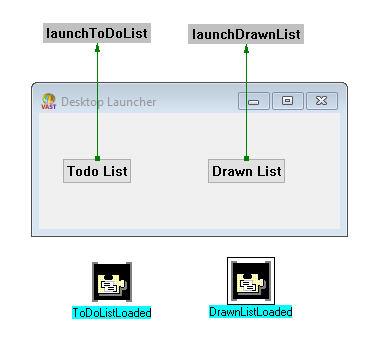
From the DesktopLauncher Composition Editor, add two Push Buttons and two Variables. Label the push buttons To-Do List and Drawn List and change their names to ToDoList and DrawnList. Label the two variables ToDoListLoaded and DrawnListLoaded and change their types to Boolean. Also change the name of the main window to DesktopLauncher and label it Desktop Launcher.
|
finalInitialize initializes both variables to false and will be invoked automatically on startup.
launchToDoList and launchIconTree handle the unloading of one IC if it is already loaded and the loading of the other IC for the selected application.

System loadComponent: returns nil only when attempting to load an IC that has already been loaded. Since you are disabling the push button which loads the IC just loaded, this should not happen. Nonetheless, you've included the code for robustness.
Further, note that you're launching the selected application with, for example, #EwxDrawnListExample asClass new open instead of EwxDrawnListExample new open. You're doing this for two reasons. First, it prevents a packaging error because of an out-of-scope reference to EwxDrawnListExample since EwExamples is not included in IcTestDesktopLauncher's prerequisites. Second, during development, assuming you are testing with ICs for To-Do List and EwxDrawnListExample and not the loaded applications, if the ICs are not loaded, the class names are undefined because the classes are not loaded. Specifying the launch code as you did allows you to resolve these potential problems.
|
a.
|
|
b.
|
|
6.
|
At this point, prior to packaging, a test is useful to ensure the desktop launcher operates correctly. First ensure that IcTestView, IcTestModel, EwExamples, and EwExamplesFramework are not loaded in your image and ictest.ic and list.ic are not loaded. Test the DesktopLauncher from the Composition Editor and try launching the applications. Note that if you attempt to switch to one application while the other is running, you see an error message. This is because the script that launches the application you selected is first attempting to unload the IC for the other running application. It fails because there are instances of classes defined in the applications in that IC. You can switch successfully if you first close the one application and then select to launch the other. If this is not a behavior you desire, and while beyond the scope of this example, you can alter the scripts that launch the applications so that they first close the running application and then unload its IC.
|
|
7.
|
|
8.
|
Package DesktopLauncher as you did the To-Do List in the first example, as a leaf IC. When you select IcTestDesktopLauncher to be added to the IC, ensure that IcTestView, IcTestModel, EwExamples, EwExamplesFramework are not added as prerequisite applications. Specify DesktopLauncher new openWidget as the startup code. Name your IC launcher.ic and your packaging instructions IcTestDesktopLauncherIcPackagingInstructions.
|
|
9.
|
