|
•
|
IcTestView provides a user interface and simple to-do list capabilities.
|
|
•
|
IcTestModel provides the domain model, in this simple case, a model of the objects contained in the to-do list.
|
|
1.
|
|
2.
|
Select IcTestModel and create a new nonvisual part, called Thing. In the Public Interface Editor, give it one attribute called name, generate the default scripts, and save the part.
|
|
3.
|
Define the instance method printOn: for Thing to be something like the following, so text is shown correctly in the user interface:
|
|
4.
|
|
5.
|
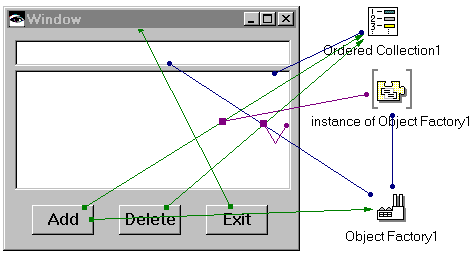
Add three Push Buttons, a Text part, a Multiple Select List, an OrderedCollection, and an Object Factory. Label the three push buttons Add, Delete, and Exit. Set the Object Factory's instanceClass property to Thing.
|
|
6.
|
Tear off the instance (Thing) attribute of the Object Factory.
|
|
a.
|
|
b.
|
|
c.
|
|
d.
|
Connect the self attribute of instance of Object Factory to anObject of the clicked-add: connection.
|
|
e.
|
|
f.
|
|
g.
|
|
h.
|
Next, complete two steps described in Packaging preparation: load configuration maps and set the correct prerequisites.
Verify the prerequisites for IcTestView because it uses the Thing class defined in IcTestModel. That is, ensure that IcTestView specifies IcTestModel as a prerequisite.
Finally, create an application called IcTestPackagingInstructions with an immediate prerequisite of EpImageInstructions. This application will contain the packaging instructions.
This example involves packaging IcTestModel as a reusable IC and IcTestView as a leaf IC. The leaf IC will include the reusable IC as a prerequisite.
This example involves a slight modification of your To-Do List example to make it platform dependent. We'll package IcTestModel and IcTestView as two platform dependent leaf ICs, one for Windows and one for OS/2.
