In this part of your example, you'll use the same To-Do List program and create two ICs. The first will contain only IcTestModel and will be an "interior" or reusable Image Component. That is, it will not contain any system startup code and so will not be able to be started like a "leaf" IC. Call this IC reusable.ic. It will need to be loaded by another leaf IC when the leaf IC starts. This happens automatically as a result of an application in the leaf IC including an application in the reusable IC as a prerequisite. You've already specified this prerequisite relationship. You did so when you included IcTestModel as a prerequisite of IcTestView.
The second IC you will create is the leaf IC (aka the Startup Image Component) that will contain IcTestView. It will depend on reusable.ic, which contains IcTestModel.
First, create a reusable IC which contains IcTestModel. You must do this first because later, when you create the leaf IC which will depend on the reusable IC, the leaf IC needs to know about the existence of the reusable IC.
|
1.
|
If you still have ictest.ic loaded in your image, remove it with the following:
|
|
2.
|
Open the packager. Notice it opens to the Choose Instructions step. Select Reusable image component as the type of package to build. Also, enter a name for the packaging instructions, IcTestReusableIcPackagingInstructions.
|
|
3.
|
Select the Modify Instructions button at the bottom of the panel. You'll modify these instructions in much the same way as you did in the previous example.
|
|
a.
|
From the left pane of the Applications and ICs page, select IcTestModel and click on >> to add it to the reusable IC. In the middle pane should appear all the applications that are prerequisites of IcTestModel. Since you are building a reusable IC, the packager automatically assigns ICs to these other prerequisites that were added by the packager when you added IcTestModel. The only application without an associated IC should be the one you just added, IcTestModel.
|
|
b.
|
Since this is a reusable IC and not a leaf IC, you do not need to specify startup code. However, you do need to specify the name of the IC file. Select the Startup Code tab. Enter reusable.ic as the name of the Output File.
|
|
4.
|
Select the Reduce button to generate the IC. When the reduction is complete, verify that there were no errors encountered. If there are errors, refer to Troubleshooting or to Advanced packaging to resolve them.
|
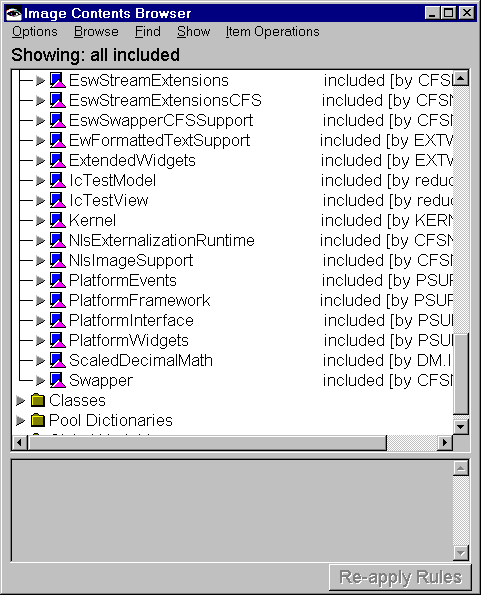
Select Examine & Fix Problems then select Image Contents from the Browse menu. You'll see lists of Applications, classes, pool dictionaries, and global variables along with notations indicating that they were excluded, included because of a reference, or included as part of the prerequisite chain. You can expand the lists and sublists to see more information.
Above is the list of applications expanded with application IcTestModel expanded to show its classes and class Thing expanded to show its methods and instance variables. Application IcTestModel and its classes are shown annotated with included - referenced, which indicates they are included as part of the IC per your packaging instructions.
|
6.
|
Specify the disposition of your packaging instructions. Select the Save Instructions button. Specify the class name as IcTestReusableIcPackagingInstructions and the application name as IcTestPackagingInstructions. Also select Keep these instructions in memory. This enables the packager to know about this reusable IC you are creating when you create the leaf IC that will depend on it. When complete, select Save now.
|
An alternative way to enable the packager to know about the reusable IC you are creating is to unload IcTestModel, explicitly load its IC, reusable.ic, and then begin packaging of the leaf IC. This may be a more desirable approach in a couple of situations. First, if you do not have access to the instructions used to create the reusable IC. Or second, if you are building a leaf IC on a memory constrained machine and have a large number of prerequisite ICs that are already loaded in your development image. In the second case, loading the packaging instruction classes for the prerequisite ICs will use up considerable additional memory.
Since you already have the packaging instructions for the reusable IC in memory, you will use them instead of loading reusable.ic.
|
7.
|
To complete packaging of the reusable IC, select the Output Image button to output the reusable IC file, reusable.ic.
|
Now, on to creating a leaf IC for IcTestView that will depend on the reusable IC you've just created which contains IcTestModel.
|
1.
|
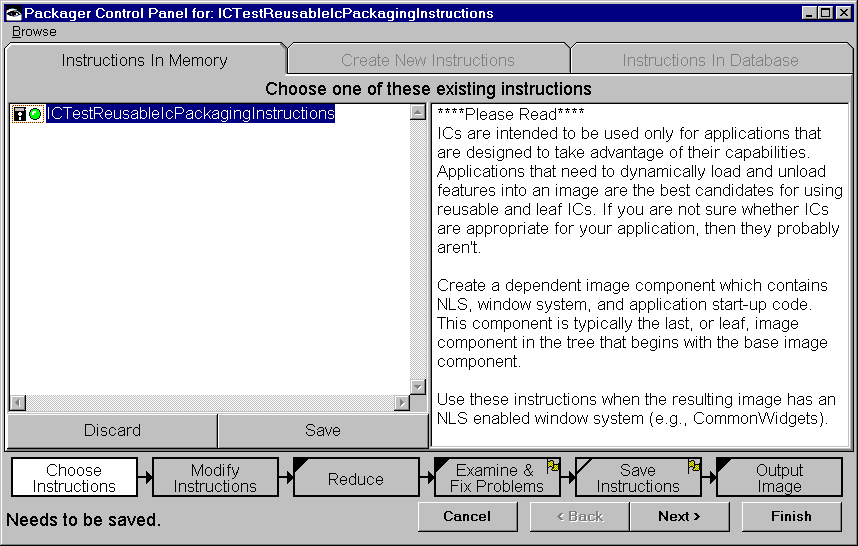
Note the entry in the left pane of the Instructions In Memory page. The packaging instructions, IcTestReusableIcPackagingInstructions, from the creation of the reusable IC, are left in memory. You need now to create instructions for your leaf IC.
|
a.
|
Switch to the Create New Instructions page to create the instructions for the leaf IC. Select VA Smalltalk startup image component w/ windows. Enter IcTestDependentLeafIcPackagingInstructions as the name of the instructions.
|
|
2.
|
Select the Modify Instructions button.
|
|
a.
|
From the left pane of the Applications and ICs page, select IcTestView and click on >> to add it to your leaf IC. Again note in the center pane the prerequisite applications that were added in addition to IcTestView. In addition to the VA Smalltalk runtime ICs, IcTestModel was also added as a prerequisite. This is because you defined it as a prerequisite of IcTestView when you created the applications. Select Default ICs to assign ICs to these prerequisite applications.
|
Note that you still need to assign an IC to IcTestModel. Do this by using the packaging instructions left in memory, IcTestReusableIcPackagingInstructions, for the reusable IC you created for IcTestModel. Select IcTestReusableIcPackagingInstructions from the right pane and click on the right << button.
|
b.
|
Since this is a leaf IC, you need to specify startup code. You also need to name the IC file. Switch to the Startup Code page and enter the following for the Application Entry Point:
|
|
3.
|
To create the IC file depleaf.ic, select the Reduce button. When the reduction is complete, verify that no errors were encountered.
|
|
4.
|
Select Save Instructions button. Specify the class as IcTestDependentLeafIcPackagingInstructions and the application as IcTestPackagingInstructions as the application in which to save the instructions. You can choose to keep these instructions in memory or discard them. Select Save now.
|
|
5.
|
Now that you have your reusable and leaf ICs, test them. Do so by either or both of the methods that were described in the previous section. If you explicitly load depleaf.ic first without loading reusable.ic, once the load is complete, you can verify depleaf.ic was also loaded due to the prerequisite relationship by browsing the IcTestModel application.
