Six of the methods are identical to those implemented for Stopwatch and TextEditor. To save time, you can copy the methods into TimeLogger. This section provides the steps for copying classes to move methods between applications. If you have not yet defined Stopwatch or TextEditor, this section also provides the code for the methods.
To copy methods from Stopwatch, you must copy Stopwatch, move the new class to DevelopTimeLogger, and then copy the methods from the new class to TimeLogger. The steps to do this are as follows:
|
1.
|
Open an Application Manager and ensure that the applications DevelopStopwatch and DevelopTimeLogger are open editions (not versions). Also ensure that the classes Stopwatch and TimeLogger are open editions.
|
|
2.
|
|
3.
|
|
5.
|
Select the new class (Stopwatch2); then select Move from the Classes menu. A window opens, listing applications to which you can move the class.
|
|
6.
|
Moving methods from the new class to TimeLogger
|
1.
|
Return to a development browser open on DevelopTimeLogger and, if necessary, update the list of classes so it shows the new class (Stopwatch2).
|
|
3.
|
While pressing Ctrl, select the methods calculateTime:, startButtonMotion:clientData:callData:, timeElapsedDisplay, and timeElapsedDisplay:.
|
|
4.
|
From the Methods menu, select Move > To A New Class. A window opens, prompting you for the name of the target class.
|
|
5.
|
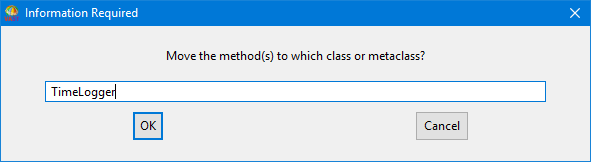
The methods are moved to TimeLogger. timeElapsedDisplay and timeElapsedDisplay: go into the Getters & Setters category; startButtonMotions:clientData:callData: goes into Event Handlers; and calculateTime: goes into Operations. Finally, delete the new class (Stopwatch2).
By following steps similar to those listed above, you can copy from TextEditor the methods fileName and fileName:. Both methods go into the Getters & Setters category.
Instead of copying methods, you can implement them by adding the following code to the class TimeLogger:
Method fileName
Method fileName:
Method startButtonMotion:clientData:callData:
Method timeElapsedDisplay
Method timeElapsedDisplay:
Method calculateTime:
After you implement all of the methods for TimeLogger, try opening an instance of the class using DevelopChooser or by evaluating:
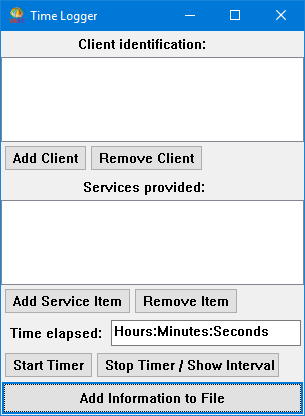
Finally, ensure that you create versions of the classes and release them to DevelopTimeLogger. To do this, from an Application Manager, select Version/Release All from the Classes menu.
Also, create a version of each application. (See Example: Creating an application version.) If you want team members to work on the applications, create a new edition of the application versions. (See Example: Creating an application edition.)
