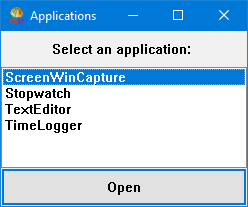
Making your own applications The chapters listed below describe how to create components using the Smalltalk development environment: • Creating applications • Defining classes • Implementing methods • Extending defined classes • Creating subapplications • More practice: Creating DevelopTextEditor and DevelopTimeLogger • Using the enhanced browsers (TrailBlazer) These chapters provide the basic steps you complete to create your own applications. They also provide several examples that illustrate how you apply the basic steps to create these five applications: DevelopChooser A window named Applications from which you can open other applications DevelopStopwatch A timer that displays elapsed time DevelopTextEditor An ASCII editor DevelopTimeLogger A program that appends to a file the time taken to do activities DevelopScreenCapture A screen capture tool that creates BMP files After you finish the examples, opening an instance of DevelopChooser displays the following: From DevelopChooser, you can open one of the other applications by selecting a name and then selecting Open or by double-clicking on a name in the list box.