Making your own applications : Defining classes : Example: Defining the class Chooser : Creating a subclass

Creating a subclass
To subclass from Object, do the following:
1.
From a standard Application Browser opened on DevelopChooser, select Object.
2.
From the Classes menu, select Add > Subclass.
3.
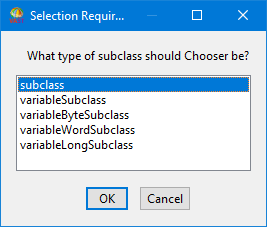
In the displayed prompter, type Chooser, then select OK. A window opens, prompting you to select what type of subclass should be added.
The choices are:
subclass
Add a class that has only named instance variables.
variableSubclass
Add a class that has indexed instance variables capable of storing arbitrary objects, and can also have named instance variables.
variableByteSubclass
Add a class that has indexed instance variables that hold bytes.
variableWordSubclass
Add a class that has indexed instance variables that hold words.
variableLongSubclass
Add a class that has indexed instance variables that hold long words.
4.
Select subclass; then select OK.
C:\Users\documentation\Documents\vastePublisher\stable\VAS Documentation Word\images\sg\stdfcls1.png
You have just created a new class in DevelopChooser. In an Application Browser, you can now view the class definition of class Chooser. In an Application Manager with DevelopChooser selected, you can see that a new class edition named Chooser is listed in the classes pane.