Tools on a tool bar can be used much like widgets. Resources such as width, height, borderWidth, foregroundColor, and backgroundColor can control the appearance of the tool. The variableWidth resource controls whether a tool shrinks or grows as the tool bar resizes.
The enterNotifyCallback and leaveNotifyCallback can determine when the mouse enters or leaves the location on the tool bar occupied by a tool. These callbacks are useful for implementing features such as bubble help or tool tips or for updating a status area.
The most commonly used tools on a tool bar are primitive tools. These are tools that behave much like simple widgets such as buttons and labels. Primitive tools have an image which determines the text or graphics that they display. The image can be any renderable object (see Renderables).
Label tools (EwLabelTool) display an image and provide a shadowed inset as specified in the shadowType resource. They provide resources for setting margins similar to the CwLabel widget. Progress bar tools (EwProgressBarTool) look and behave much like EwProgressBar. The button tools (EwPushButtonTool and EwToggleButtonTool) also behave much like their CwWidget counterparts. A separator tool (EwSeparatorTool) can separate tools or clusters of tools. The separatorType resource determines the exact appearance of a separator tool.
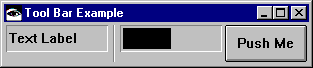
The following method creates a tool bar with four primitive tools. Add this method to a class using the pool dictionaries CwConstants and EwConstants.
When you run the method by evaluating <class name> new toolBarExample, you get the following:
Widgets can be added to a tool bar by creating a widget tool. A widget tool can be created by sending the createWidgetTool:name:argBlock: message to the toolbar. When adding a widget tool, the application specifies the class of widget to be created.
Groups (EwGroupTool) are useful for grouping multiple tools in order to assign common properties or provide specialized behavior for the group. The shadowType resource determines what kind of border is drawn around the tools within a group when the borderWidth is not 0. The spacing resource determines what spacing the group uses for its tools. If the group contains toggle button tools, the radioBehavior resource can enforce radio button style behavior within a group.
A group is created like any other tool--by sending either createGroup:argBlock: or createSimpleGroup:argBlock: to the toolbar. Tools are added to the group by sending tool creation messages to the group instead of the tool bar.
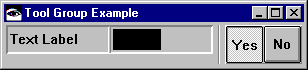
Simple groups (EwSimpleGroupTool) provide convenience methods for creating groups of buttons by simply specifying a collection of images from which button tools will be created. The buttonBorderWidth, radioBehavior, and toggleBehavior resources specify the appearance and behavior of the buttons.
