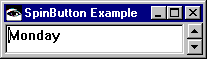
A spin button (EwSpinButton) provides an interface for selecting a single value from a collection of strings or a range of numbers. The widget consists of an entry field that displays the current value and two arrow buttons that you can use to scroll forward and backward through the values. You can also scroll through the values using the up and down arrow keys on the keyboard. The value in the text entry field can be edited directly if the editable resource is set to true. Following is an example of a spin button widget:

The itemType resource specifies whether the spin button is to display numeric data or a collection of strings. Possible values for this resource are as follows:
The minimum, maximum, and increment resources can be used to define the range values for a numeric spin button. These resources are ignored for spin buttons that hold collections of strings.
EwSpinButton also provides several callbacks for application interaction. Callback protocol is available for gaining and losing focus (focusCallback and losingFocusCallback), incrementing and decrementing the current value (incrementCallback and decrementCallback), and activation of the default button (activateCallback). A less specific callback is provided for any change to the current value (valueChangedCallback). An additional callback is provided to indicate that the value in the entry field has been edited by users (modifyVerifyCallback).
The following method creates a spin button that traverses the days of the week. Add this method to a class using the pool dictionaries CwConstants and EwConstants.
When you run the method by evaluating <class name> new spinButtonExample, you get the following: