The Microsoft Windows equivalent of a notebook control is a tabbed dialog. Instances of the class EwWINNotebook are used to create widgets resembling Windows tabbed dialogs. Construction of notebooks using EwWINNotebook is simpler than with EwPMNotebook because only a few aspects of the widget's behavior are under application control. There are only two resources; the height of the tabs, tabHeight, and the number of tabs per row, tabsPerRow. Following is an example of a WIN notebook widget:
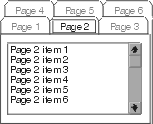
Some resources of an EwPage have no effect in a Windows notebook. Because a Windows notebook only displays tabs across the top and has no status area, the tabStyle and pageLabel resources have no effect.
The previous example can be modified to use an EwWINNotebook by substituting the following notebook creation code:
