Tree widgets (EwIconTree and EwTableTree) provide a hierarchical view of the items in a list. Only the top-level items of a hierarchy (the roots) are set in the items resource of a tree widget. The childrenCallback must be hooked so an application can provide a collection of children for any of the items in the list. The visualInfoCallback must be hooked so an application can set the hasChildren flag in the callData to indicate whether the item to be displayed has any children. This allows the tree widget to provide any visuals necessary to indicate that the item has children.
The childrenCallback is activated only for items in the list that return true as the value of the hasChildren flag of the visualInfoCallback callData.
Tree widgets provide protocol that allows applications to control that branches of the tree are displayed. By default, only the roots of a tree are shown initially. Methods, such as expandPos:notify:, collapsePos:notify:, and expandCollapsePos:notify:, allow an application to expand or collapse branches of the tree.
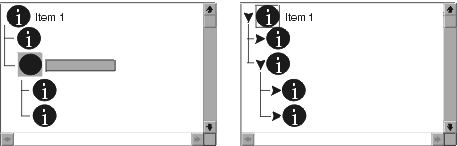
The visual appearance of the tree depends upon the value of the hierarchyPolicy resource. This resource allows applications to specify the amount of indentation that should be used to distinguish levels of a hierarchy. It also allows the specification of specialized hierarchy graphics, such as lines drawn to connect the items, or the button to be provided next to items that have children. By default, the hierarchyPolicy of tree widgets is an instance of EwHierarchyPolicy, with the lines flag set to true (indicating that lines should be drawn to illustrate the hierarchy when expanded).
Another hierarchyPolicy class is provided, named EwIconHierarchyPolicy. This policy shows an icon beside each item that acts as the expand and collapse button. To allow for proper animation of pressing the button, an application can specify a different icon to be used in each phase of the expand and collapse action.
If the application allows hierarchy navigation using double-click actions, then it must hook the defaultActionCallback to trigger expansion or collapse of the hierarchy. The icon hierarchy policy automatically expands and collapses when the user clicks on the icon.
 |
