The icon area widget (EwIconArea) provides a free-form display of objects in a list. The widget displays a text label and icon for each item in the list, using the same technique as with EwIconList to supply icons and labels. Following is an example of an icon area widget:
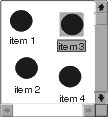
Each item in the list is associated with a location, which is a Point representing where the item is displayed in the icon area. Items can be added to the list at a specific location using the addItem:location: or addedItem:location: protocol.
Items in an icon area can be rearranged so that no items overlap using the arrangeItems function. The icons and labels an application supplies in the visualInfoCallback can be renderable (see "Renderables"). This is the same as EwIconList. The following example creates an icon area and adds an item at a specific point (the visualInfoCallback is not shown).
