Selection-box widgets (CwSelectionBox) are used to obtain a selection from a list of alternatives provided to the user. A selection box can contain some or all of the following components: a scrollable list of alternatives, an editable text field for the selected alternative, labels for the list and text field, and four buttons. By default, the buttons are labelled OK, Apply, Cancel and Help.
A selection box is usually created in a dialog shell to prompt the user to select a list item. Selection-box widgets are created using the createSelectionBox:argBlock: and createSelectionDialog:argBlock: convenience methods. The latter method is similar to the first, but also creates a CwDialogShell as the parent of the CwSelectionBox so that it can be popped up separately from the main widget tree. As with pop-up menus a selection dialog can be created and left unmanaged until it is to be presented to the user. It is popped up by sending the selection box the manageChild message. The default behavior is to remain open until either the OK or Cancel button is pressed, or the dialog's close box is double-clicked. The application can explicitly close the dialog by sending unmanageChild to the selection box.
The dialogType resource specifies which selection-box components actually appear. It can have one of the following values:
When the selection box is in a dialog shell, the dialogTitle resource specifies the title of the dialog shell, and the dialogStyle resource specifies the input mode while the dialog is active.
The labels for the list widget and the text widget are set using the selectionLabelString: and textLabelString: methods respectively.
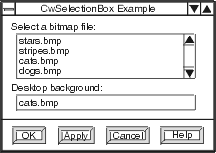
The list contents can be set or retrieved using the listItems resource. The text contents can be set or retrieved using the textString resource.
The widgets comprising the selection box can be retrieved using the getChild: method. If a button or other widget is not required by the application, it can be retrieved and unmanaged. Possible arguments to the getChild: method are:
The okCallback, applyCallback, cancelCallback, and helpCallback of the selection box are run when the corresponding buttons are pressed. If a callback is not added, the corresponding button will still appear, but nothing will happen when it is pressed. When the selection box is in a dialog shell, it is unmanaged when the OK or Cancel button is pressed, unless the autoUnmanage resource is set to false.
Using the mustMatch resource, the selection box can be configured to test whether the text typed in the text widget matches any item in the list. If mustMatch is true and the text does not match any item in the list when the OK button is pressed, the noMatch callback is run, otherwise the ok callback is run. Note that if the noMatch callback is run, a selection dialog will not be unmanaged.
The code below creates the following modeless selection dialog that is popped up when a button is pressed. The name of the Apply button has been changed to Show, and the Help button is hidden.
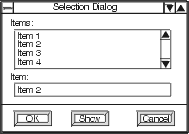
The mustMatch resource and noMatch callback are used to test when the text does not match any item in the list. Because the dialog is modeless, the user can click or type in any other widget without having to close the dialog first.
Object subclass: #SelectionDialogExample
