The text widget (CwText) provides text viewing and editing capabilities to the application. Create text widgets using the createText:argBlock: and createScrolledText:argBlock: convenience methods. The latter method makes the text scrollable, but otherwise provides basically the same functionality.
When a scrolled text widget is created using createScrolledText:argBlock:, a CwScrolledWindow widget is inserted between the text widget and the original parent. This is important to know when setting CwForm attachments, because in this case the attachments must be set on the text widget's parent (the scrolled window) rather than the text widget itself. See Scrolled lists for an example. See Form widgets for a description of attachments.
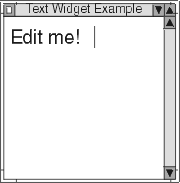
Two of the text widget's resources are editMode and wordWrap. The editMode resource specifies whether the widget supports single-line or multiline editing of text. It can be set to XmSINGLELINEEDIT (the default) or XmMULTILINEEDIT. The wordWrap resource specifies whether lines are to be broken at word breaks so that text does not go beyond the right edge of the window. The default setting for wordWrap is false.
Word wrap and horizontal scrolling are incompatible. In order for word wrap to work, the text widget must be configured without a horizontal scroll bar by setting the scrollHorizontal resource to false.
 |
CwText widgets also have resources to control the initial number of rows and columns they contain, the position of the insertion point, the width of the tab character, and whether or not the CwText is editable. For a complete list of CwText's resources and callbacks, see Appendix A, "Widget resources and callbacks". CwText widgets can also set, get, cut, copy, and paste a selection, scroll to a given line, and insert or replace text at a given position.
A CwText widget has input focus when it can accept keyboard input. A CwText usually provides some visual indication that the widget has focus, such as displaying the insertion position as a flashing I-beam or drawing a thicker border. Application developers can add a focusCallback or a losingFocusCallback to a CwText if additional behaviour is required when the widget either gains or loses focus. For further discussion on the concept of focus, see "Shell widgets". You can see an example of a losingFocusCallback with a single-line text widget in "Example: a primitive extended widget".
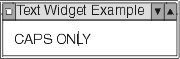
Two other callbacks provided by CwText widgets are modifyVerifyCallback, called just before text is deleted from or inserted into a CwText, and valueChangedCallback, called after text is deleted from or inserted into a CwText. The following example uses a modifyVerifyCallback to allow only uppercase letters to be entered into a single-line CwText.
|
Object subclass: #TextExample
|
 |
