The first step is to create the widget. When a widget is created, it is given a name, and its parent-child relationship is established. A new widget adopts default settings for any of its resources that are not explicitly set when the widget is created. Widget resources are data that define how a widget appears and behaves. Resources are described in Widget resources and functions.
|
•
|
Some widgets use their name to establish a default resource value. For example, shells that have titles use their name as the default title. Push button and label widgets use their name as the default labelString. Using the name in this way results in more efficient code.
|
|
•
|
Widget names are used as part of a widget's printable representation (using printOn:). They are also useful for identifying widgets during debugging.
|
When a widget is created, it does not immediately appear on the screen. In the following illustration, a label widget named CwLabel 3 has been created, along with two others, in a widget tree. Its parent is a row-column widget named CwRowColumn. A row-column widget lays out its children horizontally, vertically, or both. The row-column's parent is a shell widget named CwTopLevelShell.
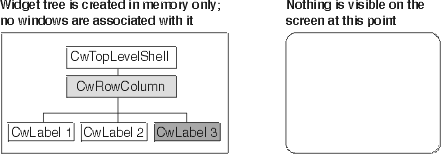
To manage a widget, you specify that its size and position will be managed by its parent widget. This process is called geometry management. Any changes in the size or position of the parent widget will be recursively propagated to managed child widgets. The application must specify that a widget is to be managed by sending the manageChild message to the widget.
To map a widget, you specify that it is to appear on the display after it has been realized. Realizing a widget is described in 4. Realizing a widget. By default, a widget is mapped automatically when it is managed. This is controlled by the setting of the mappedWhenManaged widget resource, which defaults to true. Unmanaging a widget also unmaps it.
Widgets are mapped using the mapWidget method, and unmapped using the unmapWidget method. Mapping or unmapping a widget maps or unmaps all child widgets.
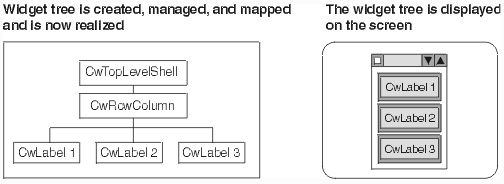
Until a widget is realized, it is invisible. A widget can be created, managed in the tree, and mapped, but it will not appear on the screen until it is realized. During realization, all widgets assume their initial geometry and create their visual appearance. Widgets are realized by sending the realizeWidget message to the topmost widget in the hierarchy, or shell widget. Realizing a widget realizes all of its children recursively. Widgets created, mapped, and managed as children of already realized widgets are automatically realized on creation.
In the following example, the CwTopLevelShell widget has been realized, and the CwRowColumn has positioned its three label children.
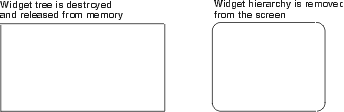
When a widget is no longer required, it is destroyed. A widget can be implicitly destroyed by the user, for example by clicking on a close box. Alternatively, a widget can be destroyed under application control by sending it the destroyWidget message. The widget is removed from the display and released from memory. Destroying a widget recursively destroys all child widgets.