Consider the two font names that follow. In the first font name, the pixel size, point size and average width fields contain zeros (-0-0-...-0-) indicating that it is a scalable font. In the second font name, all three fields have actual values (-33-240-...-180-) indicating that it is a nonscalable, or fixed size, font.
CgLogicalFontDescription class can be used to parse and modify an XLFD name. The following example determines whether or not a font is scalable by first creating a CgLogicalFontDescription object for the font.
To load a scalable font, the zeros in the size fields of the font name must be replaced by actual values and passed to one of the font loading methods. The following example illustrates the use of a CgLogicalFontDescription object to specify the point size in a scalable font name. Point size is specified in 1/10ths of 1/72 of an inch (tenths of a point), so a 24-point font is represented as 240. Also note that the pixel size and average width fields are changed to wildcards, indicating that they will be computed based on the point size.
Once the scalable font name has been modified to specify a fixed size, it is then referred to as a scaled font name. It can then be passed to one of the font loading methods that follow. Fonts are loaded into memory by sending the loadFont: or loadQueryFont: messages to a CgDisplay object. The loadFont: method takes a font name and returns a CgFont object. The loadQueryFont: method takes a font name and returns a CgFontStruct object.
In the last example, two different operations were used to load a CgFontStruct and a CgFont object. These two objects, while both representing a font, provide different kinds of information to the application.
CgFont is a handle to the font in the operating system. It is useful in applications where you simply wish to draw text and do not require a measure of the dimensions of the text.
CgFontStruct is a more detailed description of the font. It provides information that is useful when you need to perform calculations based on text width or text height, for example, centering a label in a window.
Here are some of the more useful CgFontStruct access methods:
Returns the CgFont.
Returns the first row of an array of CgCharStructs describing the dimensions of each character in the font.
Returns the specified row of an array of CgCharStructs describing the dimensions of each character in the font. Use for double-byte fonts.
Returns a CgCharStruct describing the maximum bounds over all characters in the font.
Returns a CgCharStruct describing the minimum bounds over all characters in the font.
Returns the direction in which text is drawn, the font ascender, the font descender, and a CgCharStruct describing the overall size of the text.
While a CgFontStruct holds information about the entire font, a CgCharStruct holds information about each individual character in the font. The following diagram shows some of the commonly used metrics of both CgFontStruct and CgCharStruct as they pertain to two characters 'A' and 'j' in a typical font.
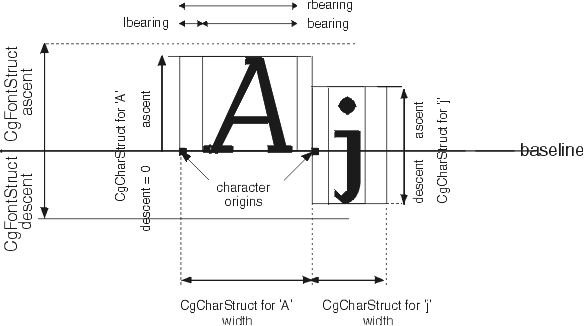
Note that the origin of each character is on the baseline, and not in the upper left. A CgCharStruct's origin is the leftmost pixel along its baseline; therefore, it is actually at a point that is 0 @ ascent with respect to the upper left corner of the CgCharStruct. This is useful to know when drawing a string inside of a rectangle drawn at x @ y. The string must be drawn at x @ (y + ascent). This is in keeping with typographic convention. The ascent, descent, and width of a CgFontStruct are equal to the largest CgCharStruct ascent, descent, and width in the font. The lbearing, rbearing, and bearing metrics are only shown for 'A.' Additional CgCharStruct instance methods follow:
