There are several methods for drawing arcs: fillArcs:arcs:, drawArc:x:y:width:height:angle1:angle2:, fillArc:x:y:width:height:angle1:angle2:, and drawArcs:arcs:. Angles are specified in 1/64 of a degree. Zero degrees is positioned at three o'clock with positive angles measuring in a counterclockwise direction. To draw an arc, you specify a bounding rectangle, a start angle (in 64ths of a degree) and an extent angle (in 64ths of a degree). The extent angle is relative to the start angle. For example, to draw a semicircle from 90 degrees to 270 degrees, the start angle would be 90 * 64 degrees and the extent angle would be 180 * 64 degrees. You can draw multiple arcs using the drawArcs:arcs: methods.
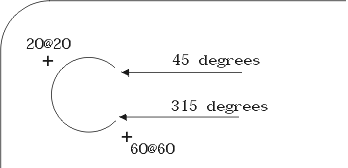 |
