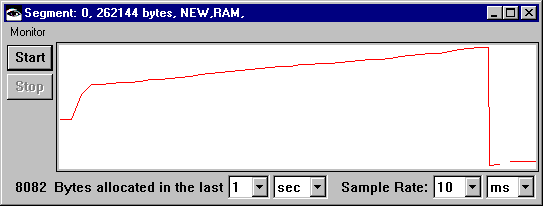
The number of bytes allocated for a memory segment within a certain time period is shown along the bottom of the Memory Monitor window. Programs that require the system to allocate a large number of bytes quickly use more memory than do programs that require fewer bytes allocated.
The extent to which objects remain in use is ascertainable by deducting the number of bytes allocated at the start of a segment from the number allocated at the end of the previous segment. Or you can estimate the extent to which objects remain in use by seeing how high a new segment begins. Segments that begin at the bottom of the graph have few (or no) objects that remain in use. Segments that begin higher up have more persistent objects. Programs that have a high degree of objects that remain in use take up more memory than do those which lose their objects during scavenges.
The frequency of scavenges is shown by the pitch and number of up-and-down lines in the graph. For the default monitoring of one-second intervals with samples taken every ten milliseconds, graphs that show frequent scavenges denote a large use of memory.
For example, suppose you press Start, and then print file names to the Transcript by evaluating the following: