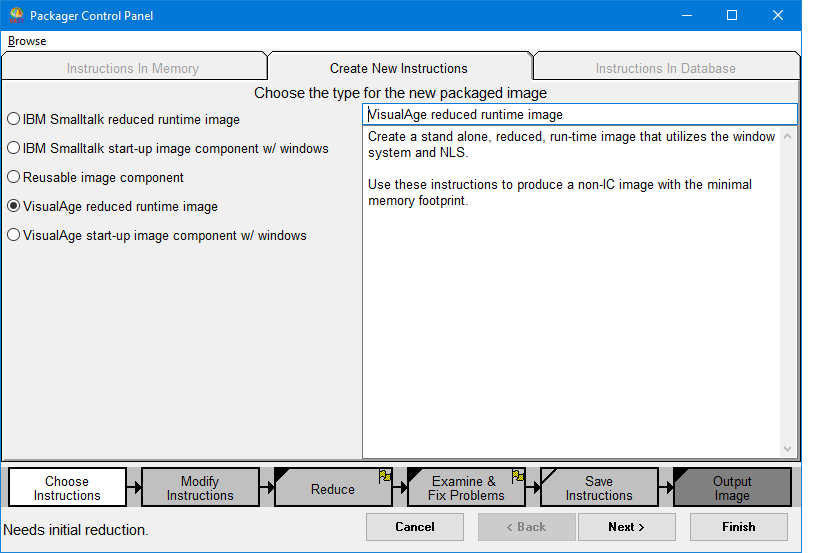
On the Create New Instructions tab, select a packaged image type. Each type contains instructions that form the basis for the new packaged image. Alternatively, you can select an instruction that was previously created and saved by selecting the Instructions In Memory tab or instructions that have been saved to a database by selecting the Instructions In Database tab.
The packaged instruction chooser lists all packaging instructions currently defined in the system (all subclasses of EpPackagingSpecification). You can either create new instructions from a list of standard instructions that are supplied for you or you can select a custom instruction you have saved in memory or in a database.
If you are creating a new packaging instruction, select a type, which can be either IBM Smalltalk reduced runtime image or VisualAge reduced runtime image. You can also supply your own name for the packaged image; this name is not required to be a Smalltalk class.
You can change the description string by editing the text in the description pane. The description is saved when the packaging instruction is saved (using the Save Instructions button).
When you open the packaging control panel to the “Choose Instructions” step, one of the packaging types will be preselected in the Create New Instructions tab. The right side of the tab describes when you might want to use that type of packaging instructions.
You can select IBM Smalltalk reduced runtime image even if you run the packager a full development image (abt.icx) so long as the application will load in the basic development image (ibmst.icx). It does not hurt to choose VisualAge reduced runtime image in this case. The reduced runtime image may be a bit larger if you do.
