You can open a debugger by selecting Open Debugger from the Tools menu. The window that opens contains five empty panes.
You can display information on a coding error in the panes by selecting Debug Other from the Processes menu. Then, if your system is storing information on previous coding errors, select one of the listed error reports.
Or, display information on coding errors by executing flawed code. For example, evaluate the following expression in a Workspace window with the Execute command:
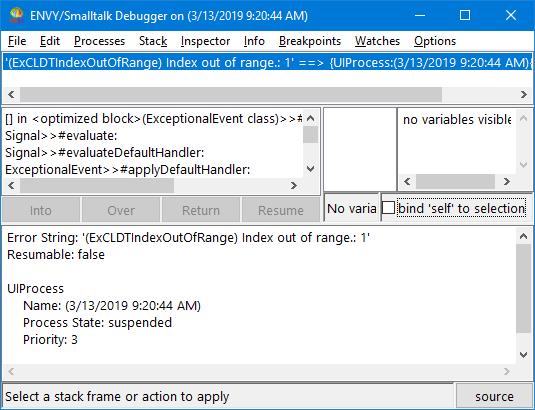
Notice the error message in the upper left pane. The message '(ExCLDTIndexOutOfRange) Index out of range' pinpoints the event that triggered the debugger.
Methods are shown using the system's format for methods: class>>#method. The # character precedes method names because method names are symbols in VA Smalltalk. ] in at the beginning of an entry indicates that a block of code in the method was executed. The word class after a class name indicates that the method is a class method; methods not having the word class are instance methods.
When you select a method from the message stack, the code for that method is shown in the description pane (the bottom pane). The expression sent is highlighted. Note that a method in the highlighted expression points to the entry just above the selected method. In the example, if you click on ExceptionalEvent>>#applyDefaultHandler:, the method evaluate: is shown in the highlighted expression. The entry just above ExceptionalEvent>>#applyDefaultHandler: in the message stack is Signal>>#evaluate:.
To the right of the error message and message stack is a list of variables, which functions like the list of variables in an Inspector window. It names the object that received the selected message and any temporary variables of the selected message. By double-clicking on a variable (or by selecting Inspect or Basic Inspect from a pop-up menu), you can open an inspector on the variable.
The preceding chapter, Inspecting objects, provides information that can help you interpret the contents of the last two panes.
