The Dictionary Inspector for CwConstants resembles the one shown below. Note that, unlike a regular Inspector window, it lists keys instead of variables in the left-hand pane. For most keys listed, selecting a key displays the value for the key in the right-hand pane.
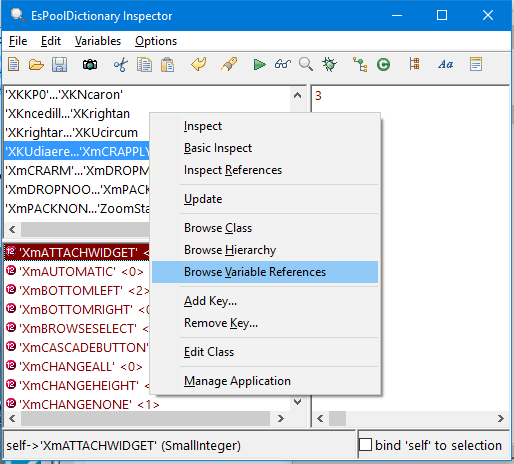
The Dictionary Inspector for CwConstants lists the keys for Common Widgets pool variables and their constant values. The example classes in this guide name CwConstants as a pool dictionary and the example methods use pool variables such as XmATTACHWIDGET. It is useful to browse Dictionary Inspectors like this when you want to find available options for implementing specific behaviors. After you find a pool variable that might suit your needs, you can select its key and then select Browse Variable References from the Variables menu. The resulting Methods Browser lists every method in your image that uses the pool dictionary entry.

You can use the values for pool variables directly in your code, instead of using the pool variable names. However, it is a safer programming practice to name a pool dictionary such as CwConstants in the definition of your class and then use the dictionary's pool variable names in the class's methods.
