When inspecting an object, you can see the instance variables of the object by looking at the list in the left pane. Generally, the list includes instance variables of the object and of the object's superclasses or defining classes. For example, the inspector for Chooser lists instance variables common to classes having a user interface. If you look at the classes Behavior, ClassDescription, and Class, you will find that the instance variables for those classes comprise the list of instance variables for Chooser.
You can see the values for variables by selecting a variable from the displayed list. For example, for the inspector open on Chooser, select a variable, such as sharedPoolNames. As shown below, the value for the object's variable is displayed.
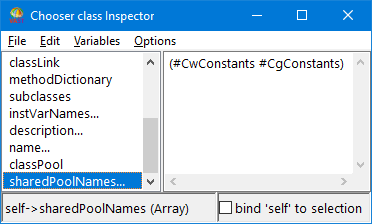
The variable sharedPoolNames has the values CwConstants and CgConstants because, when you defined Chooser, you indicated that the class uses the pool dictionaries CwConstants and CgConstants.
As to the statement (CwMessagePrompter new title: 'Prompt') prompt, inspect it twice. Compare the Inspector windows displayed when you select OK in the message prompter as opposed to when you select Cancel.
As to the statement EtApplicationManager new open, notice what happens to the variable values after you close the displayed Application Manager.
