Enhanced List Support
VA Assist Pro brings an advanced look and feel to VAST Platform. Gone are the simple black and white lists and simple hierarchical views. VA Assist Pro replaces the simple lists in all of the standard browsers with enhanced lists capable of displaying icons and color. Careful use of icons and color greatly increases the information bandwidth available to the developer. Examples include:
Use of color to indicate changed or scratch editions. Unversioned classes and applications are displayed in blue as are any methods that are new to those classes. Scratch applications and any classes or methods that have been changed within them are displayed in red.
Unreleased classes  and applications
  are displayed with a green icon. Names and version numbers associated with unreleased subapplications are shown in lavender; names and version numbers of released subapplications are shown in black. Scratch classes
  or applications
  have a red “x” in their centers.
and applications are displayed with a green icon. Names and version numbers associated with unreleased subapplications are shown in lavender; names and version numbers of released subapplications are shown in black. Scratch classes or applications have a red “x” in their centers. The icons of defined  and extended
  classes are differentiated from one another, just as the controlling application
  of a class is differentiated from other applications
  that extend the class.
and extended classes are differentiated from one another, just as the controlling application of a class is differentiated from other applications that extend the class.Loaded applications and configuration maps  are differentiated from unloaded ones
 in the Application Configurations Browser and the Configuration Maps Browser. Loaded classes
  are differentiated from unloaded ones
  .
.
and configuration maps are differentiated from unloaded ones in the Application Configurations Browser and the Configuration Maps Browser. Loaded classes are differentiated from unloaded ones .The manager  of an application is differentiated from other group members
  .
.
of an application is differentiated from other group members .Public  and private
  instance methods are differentiated from one another.
and private instance methods are differentiated from one another.Empty categories and hidden classes are grayed out.
Various attribute icons are used to indicate various special characteristics of classes and methods. Classes are marked whether they are abstract  or not, runnable
  or not, Composition Editor
  or WindowBuilder Pro
  created, etc. Methods are marked whether they are abstract or not, whether they are subclass overrides
  , whether they are special GUI builder generated methods
  or whether they reference a missing method
  .
.
or not, runnable or not, Composition Editor or WindowBuilder Pro created, etc. Methods are marked whether they are abstract or not, whether they are subclass overrides , whether they are special GUI builder generated methods or whether they reference a missing method .The various attribute icons and colors may be individually controlled via the (Options | Enhanced List Widgets) commands.

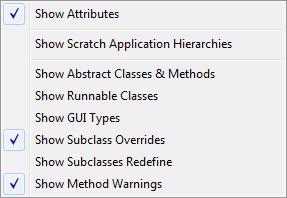
Show Item Colors menu Show Attributes menu
Some of the attribute and color calculations may be expensive of slower hardware so you can experiment with turning them on and off individually or as a group.
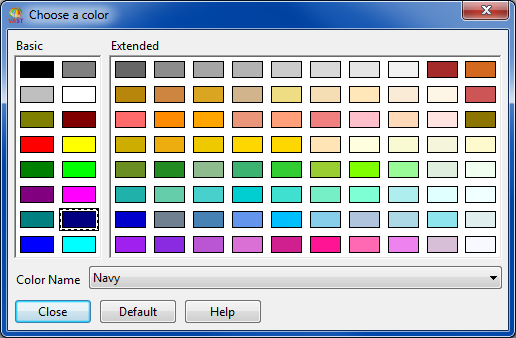
The background color of the enhanced lists may be controlled via the (Options | Enhanced List Widgets | Set List Background Color) command.
Hover help expansion of list elements in the enhanced lists may be controlled via the (Options | Enhanced List Widgets | Show Hover Help) command.
Last modified date: 08/15/2025